Дом с Алисой
- 4.0
- Rating
- 10.00M
- Installs
- Free
- Price

 Analysis by App-foxy
Дом с Алисой is a free Android app for the House & Home category, built by Direct Cursus Computer Systems Trading LLC. I approached it as a practical household companion rather than a flashy lifestyle tool, and that distinction matters: its appeal is in making everyday interaction with a home feel simpler, especially for people who already use Alice-compatible services. The app is rated for Everyone, so it is positioned as a family-friendly choice rather than something aimed at a narrow age group.
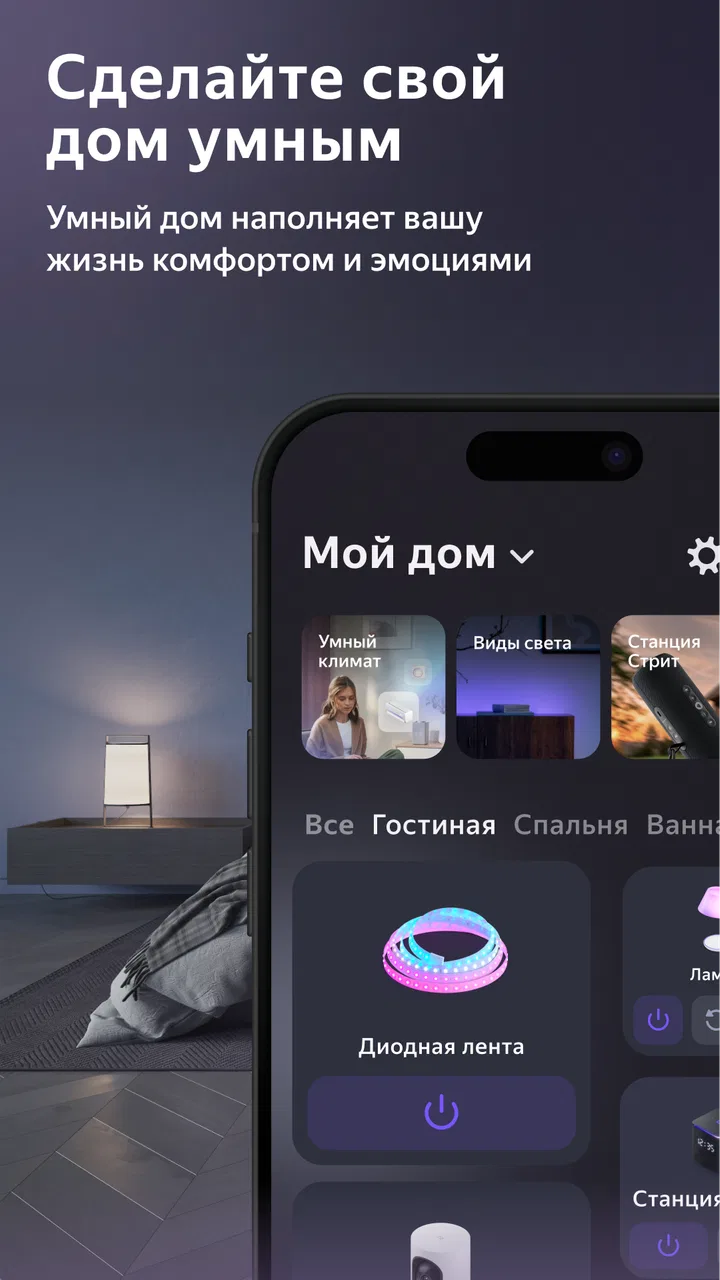
The short store description, “Дом с Алисой,” is extremely brief, but the app itself is easier to understand when viewed as a central place for managing a home around Alice. In my experience, the main question is not whether it looks impressive on the first launch. The useful question is whether it fits the way you already organize rooms, devices, routines, and household tasks. If you want a straightforward home-control environment, it has a clear purpose. If you are looking for a broad renovation planner, a detailed property-management system, or a replacement for every smart-home platform at once, you should set expectations differently.
What the app is really useful for at home
The strongest reason to try this app is convenience. A home can quickly become a collection of separate devices, rooms, and control methods. One product may have its own application, another may depend on a different account, and voice commands can become difficult to remember when several people share the same space. Дом с Алисой is designed around the idea that Alice should act as the more natural layer between the household and compatible smart-home equipment.
You May Also Like

 AccuWeather: Weather Radar
AccuWeather Review: A Quick, Clear Forecast for Everyday Decisions
For everyday plans, the best forecast is the one you can understand quickly. AccuWeather makes rain timing, radar, and local conditions easy to act on, with a few trade-offs.

 Hill Climb Racing
Why Hill Climb Racing Still Turns Crashes Into One More Run
A tiny car, a bumpy hill and one more upgrade: Hill Climb Racing keeps resurfacing because its simple chaos makes every near-miss feel personal.

 AliExpress - Shopping App
AliExpress Makes Global Shopping Feel Personal, but Shoppers Bear the Risk
AliExpress turns a global marketplace into a pocket-sized discovery engine. Its reach is useful, its shopping loop compelling, and its trade-offs easy to miss.

 Lords Mobile: Kingdom Wars
Lords Mobile Is a Kingdom-Building Routine, Not a Quick Match
A case-by-case verdict on the building, battles, device demands, and social commitments that make Lords Mobile rewarding for some players and exhausting for others.

 PDF Scanner app - TapScanner
TapScanner Makes Paperwork Easier to Capture, Check, and Share
TapScanner makes scanning with a phone feel less like a rescue operation and more like a dependable step in getting work done. Its capture tools are useful, though not flawless.

 Block Blast!
 Shows How Much a Puzzle Game Can Leave Out
A quiet grid game shows why puzzle players increasingly value instant clarity, repeatable skill and low-pressure play—and where the genre still needs to catch up.
More From Our News Desk
View All News


That makes the app most interesting for ordinary routines rather than occasional setup. Turning something on, checking a room, grouping devices by location, or creating a familiar way to address household equipment can feel more useful than opening several separate applications. I found that the value comes from reducing small interruptions. The time saved on one action is minor, but repeated actions throughout the day are exactly where a home-control app either earns its place or becomes clutter.
A realistic example is a morning routine. Instead of searching through individual device screens, a family member can use the home arrangement established in the app to interact with equipment by room or purpose. Later, someone else can use the same structure without needing to understand how each device was originally connected. That shared-home angle is more important than it first appears: a system is only convenient when other people in the household can use it without asking for technical help every time.
Another useful scenario is moving between different parts of the home. Room-based organization gives you a mental map that is closer to real life than a long list of device names. “Bedroom,” “kitchen,” or “living room” is easier to remember than a manufacturer model name or an automatically generated label. My practical advice is to name things according to how people actually speak at home. Clear names reduce mistakes, especially when several devices have similar functions.
Free access and what that means for value
The app is free, so there is no purchase decision at the point of installation. That makes the trial barrier low: you can see whether its approach suits your home without committing money first. I would still separate free access from guaranteed value. An app can cost nothing and remain unhelpful if it does not match the devices, habits, or level of simplicity you need.
For this particular product, the free price is most valuable when it replaces friction rather than when you expect a large collection of advanced tools. You are not paying for a premium planning suite or a specialist home-maintenance database. You are trying a convenient control layer. That is a good exchange for users who already want Alice involved in their household, but it is less compelling for someone who does not use compatible smart-home equipment.
The app has passed the ten-million-install mark and holds an average rating of 4.1 from around 157 thousand ratings. Those figures suggest that it has reached a substantial audience, but I would not treat popularity as proof that every home will work equally well with it. Smart-home experiences depend heavily on the devices and setup around the app. A large user base can reassure you that the concept is established; it cannot remove the need to check whether your own equipment belongs in the same ecosystem.
There is also a practical cost in attention. Even a free app asks you to spend time arranging rooms, identifying devices, and learning the preferred way to interact with the home. I recommend doing that setup carefully once instead of accepting confusing default names and then trying to fix them later. A few minutes spent on a consistent structure can make daily use much more pleasant.
Where the value appears in everyday use
The most convincing benefit is the shift from device-by-device thinking to home-by-room thinking. That sounds small, but it changes how a household behaves. People generally remember where an object is, not the exact product category or technical name. When the app reflects that reality, it becomes easier for a guest or family member to understand.
I also see value in using it as a shared reference point. If one person installs and configures every manufacturer application separately, the rest of the household may never learn the system. A central home view can make the arrangement easier to explain. This is especially helpful in homes where one person enjoys technology and another person simply wants the lights, climate equipment, or other connected items to respond reliably.
A less obvious tip is to think about failure recovery before you need it. Keep names simple, avoid creating several nearly identical labels, and make sure the people who use the home know the basic alternative if voice interaction is unavailable. Convenience should not mean dependence on one method. A well-organized app can make normal operation easier while still leaving you a sensible manual fallback.
Another useful workflow is to treat room organization as maintenance, not a one-time ceremony. Devices move, households change, and temporary equipment can remain in a list long after it has been removed. Periodically reviewing the structure prevents old names from becoming confusing. This is not an exciting feature, but it is the kind of small habit that determines whether a home-control app stays useful after the first week.
Trade-offs compared with the usual alternatives
The usual alternative is to keep using each device maker’s own application. That approach can be better when you need detailed settings, specialist diagnostics, firmware controls, or product-specific options. The manufacturer’s app usually knows its own hardware most deeply. Дом с Алисой is more attractive when your priority is a simpler household experience across compatible equipment rather than the fullest technical control of one product.
Another alternative is relying only on voice interaction without organizing the home carefully. That can feel fast at first, but it becomes fragile when names overlap or several rooms contain similar devices. The app’s organizational role is therefore important even for people who prefer speaking commands. A clear structure gives voice interaction a better foundation and makes it easier to correct mistakes.
You might also prefer a more advanced smart-home platform if you want elaborate automation, detailed condition-based rules, or broad compatibility across unrelated ecosystems. That kind of platform can offer more control, but it often demands more setup and more patience. My view is that Дом с Алисой makes more sense for users who value an approachable everyday layer than for hobbyists who want to tune every technical detail.
The trade-off is simplicity versus depth. A simpler interface can be easier for a family, but it may not satisfy someone who wants to inspect every device state or build a highly specialized system. That is not a flaw in isolation; it is a choice about who the app is serving. The mistake would be installing it while expecting it to behave like a professional automation console.
Small habits that improve the experience
Start with the rooms people use most often instead of trying to perfect the entire home immediately. This gives you a quick test of whether the organization feels natural. If the first few rooms are easy to understand, you can expand the arrangement without creating unnecessary complexity.
Use names that remain clear when spoken aloud. Short, distinct labels are preferable to clever names that sound similar. This is particularly important in a busy household, where a command may be given quickly or by someone who did not configure the system. The best naming scheme is not the most technical one; it is the one another person can guess correctly.
Do not judge the app solely by the first setup screen. The real test is what happens after the novelty fades. Can you find the right room quickly? Can another household member understand the arrangement? Does the app reduce the number of steps you normally take? Those questions reveal more than an attractive initial impression.
It is also worth deciding which actions genuinely deserve central control. Bringing every possible device into one place may sound ideal, but a crowded system can be harder to use than a focused one. I prefer adding the equipment that is used repeatedly and leaving specialist controls in their original applications when those controls are more useful there.
Who will get the most from it
This app is a strong candidate for people who already use Alice or plan to build a compatible connected home around it. It is also suitable for families that want a shared, less technical way to interact with household equipment. The Everyone age rating supports that broad audience, although the actual ease of use will still depend on how carefully the home is arranged.
It may be particularly helpful for someone who has become tired of switching between separate device applications. The free price makes experimentation sensible, especially if you can test it with the equipment you already own. In that situation, the app has a clear chance to become a daily utility rather than another icon that is opened once and forgotten.
I would be more cautious if your home is not built around compatible equipment or if you want a detailed property-management tool. The app should not be your first choice for tracking repairs, planning renovations, cataloguing household documents, or managing a rental property. Those tasks need different kinds of software. Its value is concentrated in the Alice-centered home experience.
Technical enthusiasts who enjoy deep manufacturer settings may also prefer to keep the original applications close at hand. Using this app does not necessarily mean every other tool becomes unnecessary. In my view, the sensible arrangement is often complementary: use the simpler home layer for routine interaction and return to a device-specific app when you need advanced configuration.
Compatibility expectations and setup questions
A common question is whether installing the app alone transforms an ordinary home into a smart home. It does not. Its usefulness depends on the equipment and services you connect around it. Before investing time in a full arrangement, I would begin with the devices you actually use every day and see whether the resulting workflow feels natural.
Another question is whether it is suitable for children or older relatives. The Everyone rating indicates a broad content audience, but that is different from promising effortless operation for every person. For shared use, the most important preparation is clear room naming and a short explanation of the basic actions. A simple structure can make the experience approachable; a messy structure can make even a well-designed app feel difficult.
Users may also wonder whether the app replaces the original device applications. I would not assume that. The original app may still be the better place for product-specific settings, troubleshooting, or detailed adjustments. Think of Дом с Алисой as a convenient household layer, not automatically as the only application you will ever need.
The Android requirement is also practical: it supports devices running Android 8.0 or later. If your phone meets that requirement, the free installation makes a direct test the most reliable way to judge the fit. I would spend a short period using it during normal routines rather than deciding from the store summary alone.
My verdict on installing it
After looking at the app as a real household tool, I see a clear and limited value proposition. It is free, focused on House & Home use, and designed to make Alice-centered interaction feel more organized. Its best contribution is not a dramatic new capability; it is the reduction of small points of friction between people and the connected equipment around them.
The best reason to install it is simple: it can turn a scattered collection of compatible home devices into a more understandable shared routine. That benefit is strongest when several people use the same rooms and need familiar names and straightforward access. It is weaker when you have no compatible equipment, want professional-level automation, or mainly need maintenance and property-management features.
Direct Cursus Computer Systems Trading LLC has released it as a free app for a broad audience, and its large install base shows that the approach has found many users. Still, I would make the decision based on your home rather than the popularity figure. Try it if you want a simpler Alice-based control experience and are willing to organize your rooms thoughtfully. Skip it if your needs are centered on detailed hardware diagnostics, complex automation, or non-smart household administration.
My final recommendation is therefore positive but specific: install it when convenience and shared home control matter more than technical depth. Give it a fair test with real daily routines, use clear names, and keep specialist manufacturer tools available for the jobs this app is not meant to handle. At no purchase price, that is a reasonable experiment, and for the right household it can become one of those quiet utilities you notice most when it is no longer there.
FAQs for Дом с Алисой
01What is Дом с Алисой and what features does it offer?
Дом с Алисой is a smart home management app that integrates with various smart devices, allowing users to control lighting, security systems, and more through voice commands or a mobile interface. It also provides real-time updates and automation features to enhance user convenience and home security.
02Is Дом с Алисой compatible with both Android and iOS devices?
Yes, Дом с Алисой is compatible with both Android and iOS platforms. Users can download the app from the Google Play Store or Apple App Store. Ensure your device meets the app's system requirements for optimal performance and compatibility with your smart home devices.
03What smart devices can be controlled through Дом с Алисой?
The app supports a wide range of smart devices, including lights, thermostats, security cameras, and more. It is designed to work seamlessly with popular smart home brands. Users should verify specific device compatibility on the app's official website or within the app's settings.
04How secure is my data when using Дом с Алисой?
Дом с Алисой prioritizes user privacy and employs advanced encryption protocols to secure data. It ensures that personal information and smart home device data are protected from unauthorized access. Users are encouraged to regularly update the app to benefit from the latest security enhancements.
05Are there any additional costs or in-app purchases associated with Дом с Алисой?
While the basic features of Дом с Алисой are free, some advanced functionalities may require a subscription or one-time in-app purchases. Users should check the app's pricing details within the app store listing or the app's settings to understand any potential costs.
Pros
- Voice commands for smart home control.
- Integrates seamlessly with other devices.
- User-friendly interface design.
- Customizable routines and scenarios.
- Supports multiple languages.
Cons
- Requires stable internet connection.
- Limited compatibility with some devices.
- Occasional voice recognition errors.
- Privacy concerns with data collection.
- Subscription needed for premium features.

Дом с Алисой
Gallery